Saturday, February 13, 2010

Get more space for websites on Firefox

When I’m using a web browser it’s because I want to surf the web. Pretty obvious, isn’t it? Apparently it is not as obvious as I thought. Almost all browsers have thousands of useful features allowing you to get contextual information, see where you’ve been before or what other users think about the site you’re browsing. That’s not my case. If I go to Gmail, I want to see Gmail. Not what others think about Gmail, not the last webpage I’ve been or other things, just Gmail.

In order to maximise the browsing space, you can do a couple of tricks on Firefox:

  • Hide your Menu Bar (you can access it by pressing ALT at any time if you need it). Just go to View -> Toolbars -> Navigation Bar

firefox-menu-bar

Now you’ve plenty of pace for your websites :)

Wednesday, February 3, 2010

Using Windows Live Writer on Linux ( Ubuntu )

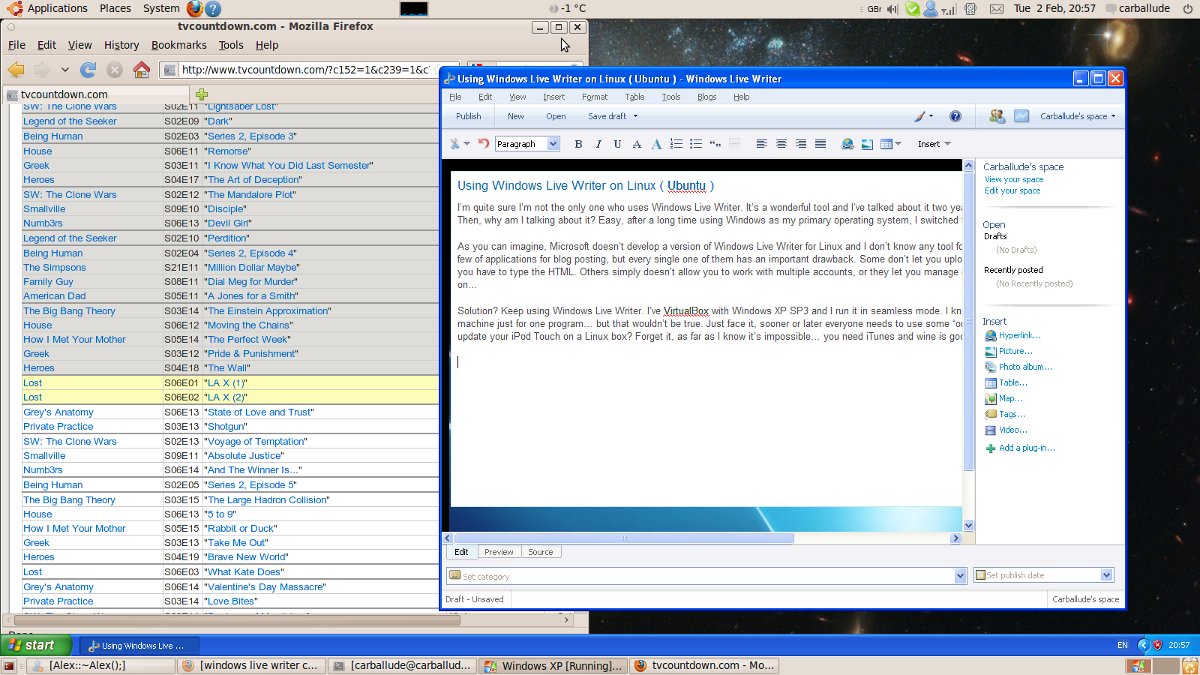
I’m quite sure I’m not the only one who uses Windows Live Writer. It’s a wonderful tool and I’ve talked about it two years ago so I’m not going to say the same twice. Then, why am I talking about it? Easy, after a long time using Windows as my primary operating system, I switched to Ubuntu.

As you can imagine, Microsoft doesn’t develop a version of Windows Live Writer for Linux and I don’t know any tool for doing the same. Don’t get this wrong, there are a few of applications for blog posting, but every single one of them has an important drawback. Some don’t let you upload pictures, others doesn’t have spell checker or you have to type the HTML. Others simply doesn’t allow you to work with multiple accounts, or they let you manage different blogs, but only WordPress based, and so on…

Solution? Keep using Windows Live Writer. I’ve VirtualBox with Windows XP SP3 and I run it in seamless mode. I know it sounds a little bit strange using a virtual machine just for one program… but that wouldn’t be true. Just face it, sooner or later everyone needs to use some “only-windows” application. Did you ever tried to update your iPod Touch on a Linux box? Forget it, as far as I know it’s impossible… you need iTunes and wine is good, but no so great.

Wednesday, January 6, 2010

How to jailbreak an iPod Touch 2G (firmware3.1.2)

I’ve jailbreaked my iPod Touch 2G (firmware 3.1.2) using the blackra1n method. It is extremely simple and you won’t lose your apps; you just have to click a button.

  1. Download BalckRa1n (Windows or Mac).
  2. Open iTunes and plug in your iPod.
  3. Open BlackRa1n (if you’re using Windows, run it as Administrator).
  4. Click on “make it ra1n”.

blackra1n 

Now you have on your iPod a new application called “blackra1n”:

IMG_0006

You can use it to install Cydia and Rock, two package managers you can use to install applications on your iPod :)

IMG_0007

So... now you’ve your iPod jailbreaked with everything you need. It was easy, wasn’t it? :)

Sunday, November 15, 2009

Let’s play karaoke!

SingStar is probably the most famous karaoke game. However, it only runs on PlayStation 2 or PlayStation 3, which aren’t really cheap.

If you’re one of the millions of karaoke fans who don’t have a PlayStation, don’t worry, there is hope for you: UltraStar. It can runs on Windows, Linux and (if you’re lucky enough) MacOS X.

Once you’ve UltraStar working, you’ll need something to sing... otherwise the game will be really boring :P The easier way to get songs is using the “SingStar Spain”community website. There’re English websites, but due to copyright issues, they only have the TXT file used by UltraStart, so you’ll need to find the images, the music and the video by yourself.

If your Spanish is not good, don’t panic, you can use the Google Translator. It’s not perfect, but you’ll be able to manage around the web ;)

Wednesday, November 11, 2009

18 buttons mouse, is it too much?

Have you heard anything about the OpenOffice Mouse? Basically it's a mouse with 18 button and they say it'll be the most useful mouse ever.

OpenOffice Mouse
OpenOffice Mouse

I've a keyboard (surprised? :P), but it's not a plain keyboard, it's a multimedia one, which means that it has a few extra keys to control a media player, and some other things. I've to admit that its 13 extra buttons are useful but they're always pissing me off. My keyboard is not the only one I've to use, I've a laptop and I've to use computers on campus and so on. The problem is that normally those keyboards also have multimedia keys... but in different places.

As a result I have to look to the keyboard and look for the appropriate key. In other words, I'm losing the advantage of having a fast access.

I'm just wondering, are this fancy mice really useful? Can they simplify our interaction, or are they just another well intentioned tool with a poor design? According to their web site the buttons will do different things depending on the application. As an engineer I can see why, as a user I'll throw it away when the “Copy” button (in OpenOffice) will try to do something else on my desktop.

Apple has a very different approach, Magic Mouse. It has no buttons at all. All its surface is a multi-touchpad.

Apple Magic Mouse
Apple Magic Mouse

Honestly, which one would you prefer?

Tuesday, November 10, 2009

Will it be possible to resurrect this blog?

Yes, at least that's what I hope ;) It has been a long time since my last post, thousands of things have happened but you don't wanna read them and I've not time... so it would be pointless for me to write a long post :P

Let's say that I've been graduated and I'm now undertaking a master on Human Computer Interaction at the University of York (I know, I know, I look awful, but that's how I am).

I didn't know but this master is bombing my mind with hundred of new ideas every single day... so I will try to post hear every couple of days with my impressions. It will be more like a place for me to clarify my own ideas rather than a useful resource for you to find answers, but hey! It's my blog :P

As always, I'll be more than pleasant to hear from you so... don't hesitate, comment!

That's all for now, be happy ;)

Thursday, July 16, 2009

Going back to Portsmouth

In less than twelve hours I’ll be at the airport going back to Portsmouth. My intention was to attend to the graduation ball this Saturday, unfortunately my +1 ran away at the last minute and I forgot to collect my ticket, so I don’t know if I’ll be able to attend to it, but I’ll try ;)

Even if I won’t be able to achieve my intention, I’ll be with my family in my graduation ceremony this 22th. As you can imagine, I don’t wanna miss my own graduation :P

Wish me luck!

Monday, May 11, 2009

Coraline – Good for kids :)

Today I went to watch Coraline. I knew it was for kids, but it had good critics and some of my friends wanted to go... so we all went together.

The argument is credible and there are no big failures, it's not as other kids films with thousands of wizards and people coming from nowhere. The history begins when Coraline's parents move to another house. It looks like a normal house, but it keeps a huge secret... a door which connect the real world with another perfect and happy world (yeah, like Narnia :P). Unfortunately, that world is not as good as it seemed to be.

I've paid ₤5.45 and... well... if I were you, I'd wait for the DVD with a bargain price.

Monday, May 4, 2009

I’m a Fedora user

I've been user of Mandrake (now Mandriva) back in the late 90's. With the millennium change, I also changed my Linux distribution to Debian / Ubuntu. Hoever, I've never been close-minded to other distributions and operating systems. Recently one of my friends at AsturLinux was appointed ambassador of Fedora, so I've decided to give  it a try.

I started downloading the x86_64 version for my Core2Duo. I don't know why on earth they hide the 64bits version. I had to browse through the whole FTP to get it. Fortunately that was the only trouble I had to solve.

The installation process was easy and painless. There was no problem with the boot-loader (actually, Fedora found my hackintosh!), and 20 minutes after my system was up and running. It was the first time my laptop could be suspended!

I've had some troubles with different applications (like Skype), but it was because I was trying to use 32 bits applications on my 64bits system without the appropriate 32bits libraries. It is really easy to solve... but you've to know where is the problem coming from.

Being honest, the only thing I've had to change was the size of the fonts, 10p is excessively huge for my 13” laptop screen.

At this very moment I'm writing this on OpenOffice -while listening music on Banshee- and I'll publish it with Windows Live Writer running on Windows XP inside VirtualBox (which is incredibly fast by the way). Everything on my Fedora 10 without any problem. That's what I like of Fedora, I do what I want without worries about “how” I want it.

Saturday, March 14, 2009

How to Jailbreak an iPod Touch 2G

As you may know, I’ve got an iPod for Christmas. The problem is that if you want to develop something for it, you’ve to pay to Apple a license. Even if you pay, the only way for others to install your application is by using the App Store, which means that Apple has to approve your application.

Couple of weeks ago I wrote a post about how to Jailbreak the iPod to bypass these limitations. However, that method was tethered... in other words, you’re iPod wouldn’t be able to boot by itself; it would need a computer to do it.

Some days ago a full Jailbreak was released. I’ve followed a simple instructions to Jailbreak my iPod Touch 2G and I haven’t had any troubles. As soon as I’ve enough time (which will be in May) I’ll try to learn a little bit of Objective-C to develop something for it :)

If you’re on Mac, you can try the method at iClarified, but I didn’t test it.

CURL library for C# ( dotNet )

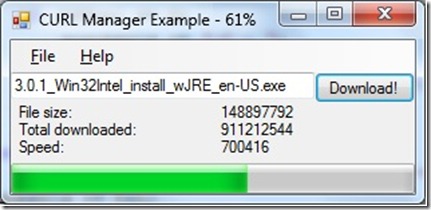
Couple of days ago I needed to download files from a TFTP server. I remembered that there was a CURL binding for .Net, so I checked it.

It was powerful and complicated. I just wanted to download a bunch of files, no big deal. So I wrote a small and simple wrapper for CURL in C# to do it.

CURL Manager Example

I don’t know if it can be useful, but I’ve uploaded the library and a Visual Studio Project demonstrating how to use it. Feel free to use it ;)

Friday, March 13, 2009

Prize at the Student Research Conference

Last Wednesday 11th of March was the Student Research Conference. Organized by the University of Portsmouth, the conference is opened to all the students of the University. I’ve taken part in it by presenting my research on distributed filing system.

My presentation “Harnessing the power of Peer-to-Peer technology to create a secure and low-cost filing system” was elected as the best. That was a total surprise! I’ve never thought about winning the prize, firstly because my English, and secondly because the level was really high. However it seems like I underestimate myself :)

There was a lot of amazing projects. I found the work conducted by Mark Bollman and Waheed Bhatti on “Cellular Automata and Genetic Behaviour” and “Nucleus – peer to peer information sharing”, particularly interesting. I know it is unlikely for them to read this, but if somehow you manage the way through here, you’ve to know you’re awesome!

If someone is interested, my presentation can be downloaded in PPTX, PPT and ODP.

Tuesday, March 3, 2009

Linux Kernel with Intel Compiler

It has been a long time since the last time I wrote here. I’ve been working on my project and it is almost done… just two milestones more and it should be ready :) However that’s not the topic of this post.

Yesterday I saw a piece of news about the progress of the LinuxDNA group. I’m not using Linux right now, but I used to, and if you know anything about it, you know that GCC is everywhere. The kernel and the vast majority of all the GNU applications have been designed to be compiled with GCC. The LinuxDNA group has been working to bring the power of Intel C/C++ Compiler to Linux.

Recently they have been capable of compile the kernel in a Gentoo. According to their data, compiling the kernel with the Intel Compiler boosts up to 40% for certain parts and an average of 8.5%.

I don’t have an extensive knowledge about compilers, but it sounds to me like a good research without practical use. Don’t take this wrong, it’s an amazing work, I’m just saying that I don’t think this will make a difference in our machines performance.

We’re using GCC because it’s extremely portable. You can cross-compile whatever you want, and you can use it to compile all your system for a bunch of different architectures. With Intel Compiler we will boost our system around 8.5%, but only for those who run Intel processors… even AMD is out of the target!

In my opinion, we should wait until more performance date will be available and then, think if it’s worth.

Be that as it may, it’s a great research and another option to boost up our system ;)

Wednesday, February 4, 2009

Visual Studio 2008 can’t be installed because Microsoft Visual Studio Web Authoring Component

Today I’ve tried to install Visual Studio 2008 on Windows 7 and it wasn’t easy. The installer was abnormally exited while it was trying to install “Microsoft Visual Studio Web Authoring Component”.

The installation log was: DepCheck indicates Microsoft Visual Studio Web Authoring Component is not installed

I thought VS was incompatible with Windows 7, but I checked it and it can works without issues on Windows 7. The problem was Office 2007. I don’t know really why, but uninstalling Office, installing VS and reinstalling Office seemed to solve the problem.

If you’ve any explanation, please share it, cause I have no fucking clue.

Tuesday, February 3, 2009

I’ve finished my exams!

Today I’ve had my Human Computer Interaction Design exam. It has been the last exam of the semester, so since now I’m a free man.

Next semester will start on 9th of February... so I only have less than a week. Well, it is more than nothing :)

Monday, February 2, 2009

IPod Touch Second Generation (2G) Jailbreak: RedSn0w

Couple of days ago, I said that one workaround for the need of a license in order to develop iPhone / iPod Touch applications could be the Jailbreak. Unfortunately I’ve a second generation one and there was no Jailbreak available. Well, that has change, but not so much.

Many sites around the Internet are talking about a new Jailbreaking method for the second generation iPod Touch, called Tethered RedSn0w. However there is a little bit of confusion outside about the drawbacks of this method.

It’s absolutely true, there is a jailbreaking for second generation iPod Touch, but this method requires you to connect the iPod to a computer and perform the jailbreaking every single time the iPod boots. You can put it into sleep mode without problem, it is only necessary if you turn it off and on again.

This is an important drawback for me, so I’ll wait until they found another way. Besides, there is no official support for this Jailbreaking. However, I’m really confident in their skills and quite sure we will see a better method in the next couple months.

Doubtless Chronic and iPhone-dev team have done a great work and they are still working on redsn0w to eliminate this annoying drawback. Good luck guys!

Sorry about the lack of updates

For some reason, I forgot I had this blog here and I’ve been updating only http://namespace.carballude.es

I truly encourage you to use the address showed above, but now I realize I also have this one, I’ll keep it up to date.

Sorry for any inconvenience :(

Friday, May 30, 2008

I have a C1!

A couple of weeks ago, I took the IELTS test in order to get a certificate about my level of English.

Well, I have a C1 level, which means that I am qualified to study in almost any University in the UK... cross fingers. The truth be told it is the second higher level you can get. European system has three letters (A, B and C) and two levels in each one, A1 the lower level and C2 the highest.

I really want to improve my English, in fact, that is the reason of this blog, so I will be very happy if you leave a comment correcting this post ;)

Saturday, May 17, 2008

How to fix the Windows Vista 0xc000000e error

My first Linux distribution was Mandrake (a.k.a. Mandriva),  since that I have always used Debian or Debian based, like Ubuntu. However, I really like to try other distributions and yesterday I downloaded the third beta of Suse 11.0.

I have an ATI X1600 Pro, and that was the first problem. The installation couldn't detect it well and used the vesa driver... with my double monitor system. Anyway, that is not a big deal, the real problem came when I wanted to boot my Windows Vista.

As you can imagine, I couldn't. The loader said "0xc000000e The entry could not be loaded because the application is missing or corrupt"

The way to fix it wasn't very easy. I booted from my Vista DVD and I selected the repair option, later the command prompt utility.

In order to fix the issue, we have to set the partition as active, you can use the "diskpart" command to do that (you can write "help" if you need it).

Now we have to repair the boot sequence, so we need to write:

bootrec /fixmbr
bootrec /fixboot


Now you should be able to start your windows but in some cases you need to reboot and boot from your Windows Vista DVD and select the "startup repair".


Good luck! I really hate this kind of bugs...

Monday, November 26, 2007

Short introduction to Eclipse

Every day I can see many people working with some IDEs like Jbuilder X, and when I ask them why are they using it instead of Eclipse they usually say that they don't know how to work with it. This is a little introduction and I want to show the very basic functions of Eclipse.

First of all you need to have Eclipse. You can go to www.eclipse.org and download “Eclipse IDE for Java developers”. After that, if you open Eclipse you may be asked about your workspace. What the hell is that? It is a work environment, if you come from Jbuilder, this is a new concept. In a workspace you can have different projects connected in some how. For example, different exercises of the same course.

Now you can see a welcome screen. Do click in “Workbench”:

Do “File -> New -> Java Project” and choose a name for the project and click Finish. Other options are irrelevant at this moment. I have called my project “Example”.
At the left side of Eclipse window you can see a bar called “Package Explorer”. This bar contains all projects you create. Do right click in src folder and choose “New -> Package” to create a new java package. I will called it “com.namespacecarballude”

To create a new class in the package you only have to perform a right click in the package you want, in this case “com.namespacecarballude”, and choose “New -> Class”. I will select “public static void main(String[] args)” and Eclipse will auto-generate a main method.

Write “System.out.println(“Hello World from http://NamespaceCarballude.blogspot.com”);” inside the main method. To execute and test the class, you have different ways. I usually press SHIFT+ALT+X and then J. If not, you can perform a right click in Test class and choose “Run As -> Java Application”.

If you want to save your work and transfer it to another computer, you only have to copy your workspace directory and use it in the other computer.

At this moment you can create projects, packages, classes inside packages and run them. It is not so much, but it is a start.

As always, if you see something wrong, feel free to correct my writing; I'd appreciate it and I will try to fix the mistake as soon as possible.